![logo_help.png]](https://knowledge.symbolsecurity.com/hs-fs/hubfs/logo_help.png?width=120&height=57&name=logo_help.png)
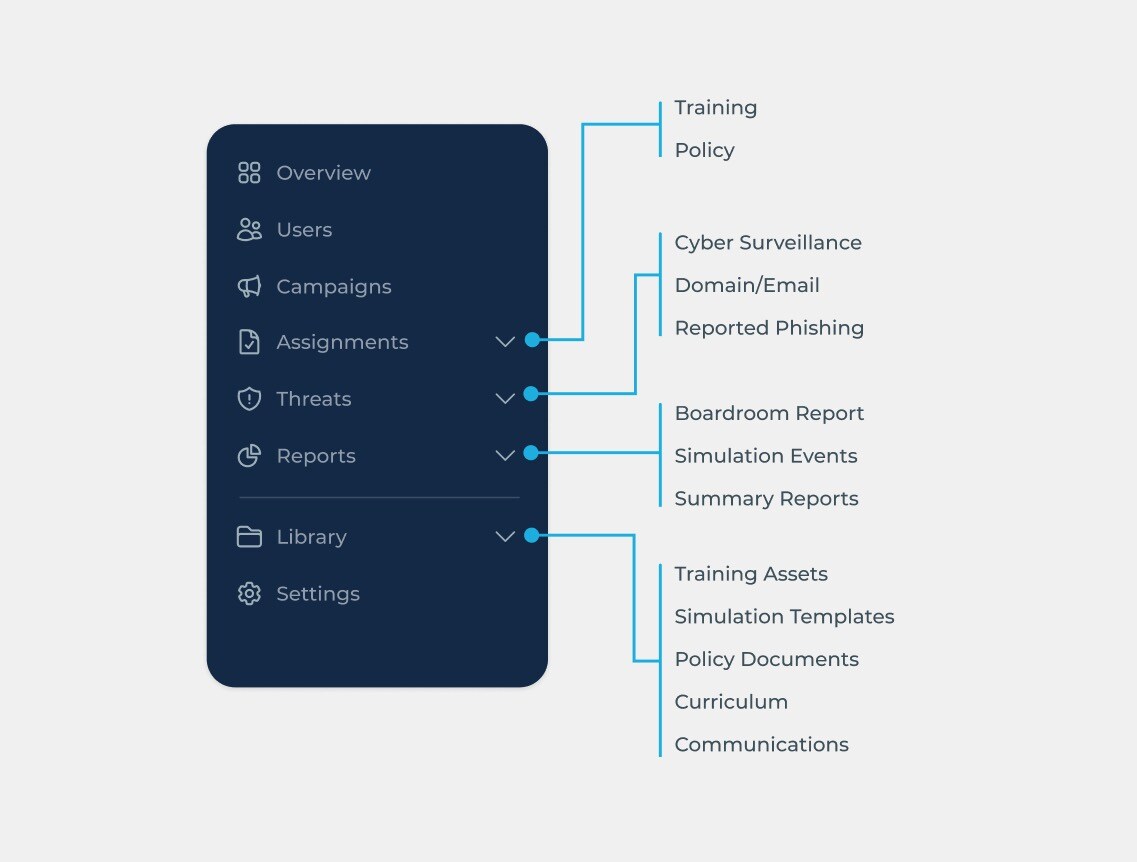
- The Dashboard will now be called “Overview”. It will keep the same information as usual but some changes will be included in the overview in upcoming releases.
- Assignments will now list both Policy and Training assignments instead of having different sections in the sidebar for each of them.
- Threats is a new item that will now contain all common threat features in the application, such as:
- Cyber Threat Surveillance (which previously had its own item in the sidebar).
- Domain & Email Threats (which was previously listed inside “Reports”).
- Reported Phishing (which was previously called “Phish Alerts”).
- Reports will simply stop listing Domain/Email threats and Phish Alerts and will only contain everything related to reporting, such as:
- Boardroom Reports.
- Phishing Simulation Events (which previously had its own item in the sidebar).
- Summary Reports.
- Library will now contain new items which are:
- Training Assets list
- Policy Documents
- Curriculums
- Communications
- Settings (which was previously accessible only from the header dropdown) now has its own section in the Company Portal sidebar.
- Notifications have been moved to the New Company Settings view.
- Policy Storage Integration has been moved to the Company Settings view under the tab "Integrations".